

The Future of Learning Is Not a Better Summary. It’s a Better Interface.
How a single prompt can turn books, research, and documents into interactive tools you can search, navigate, cross-reference, and reuse.


We keep treating learning as a reading and classroom problem.
Read more books. Read faster. Highlight better. Take more notes. Ask AI for a summary. Chat with the document. Keep going until the pile of knowledge gets smaller.
But the pile never gets smaller.
New books, reports, papers, documentation, course material, internal memos, strategy decks, and research threads are being created constantly. The amount we need to understand is growing faster than the time we have available to understand it.
That is the real pressure most knowledge workers feel right now. It is not that reading is bad. Reading is wonderful. Deep reading still matters. But deep reading is also expensive. A single 300-page book can take six to eight hours to read front to back before any real synthesis begins. Three books can become weeks of fragmented effort.
And even after you read them, you do not retain everything. You remember fragments. You keep highlights. You take notes. But when you start reading across multiple sources, the most important insights often live only in your memory.
This is where the traditional linear reading approach to learning starts to break.
The problem is not simply that we have too much to learn.
The problem is that we are trying to learn through interfaces that were not designed for the way we now need to work today.
The two default approaches both stall
Most people respond to the learning problem in one of two ways.
The first approach is linear reading. You take a book, report, or long document and move through it from beginning to end. You highlight. You annotate. You take notes. This works very well when the source is short, the material is important, and you have enough time to slow down.
But it fails at scale.
If you need to understand one report, linear reading may be the right answer. If you need to understand an entire field, compare several sources, extract the themes, and apply them to your work, the front-to-back model quickly becomes a bottleneck.
The second approach is chat-based Q&A. You upload a document into ChatGPT, Claude, or another AI system and ask questions about it. This is much faster for lookup. It is useful when you need a quick summary or a specific answer.
But it also has limitations.
A chat window is still sequential. It is still ephemeral. It requires you to know what to ask. The output lives inside the conversation, which means you have to return to that thread, scroll through it, and reconstruct what you learned. The interface is not designed for exploration, comparison, retrieval, or reuse.
So we end up with a strange situation: AI can process huge amounts of information, but we still consume the result through formats that are often hard to navigate.
That is why I think the next major shift in AI-enabled learning is not just better summarization.
It is better knowledge navigation.
Expedited learning is an interface problem
A good interface changes what you can do with a system.
It does not merely make information prettier. It makes information usable. It gives you structure. It gives you multiple paths. It lets you move from overview to detail, from question to answer, from one idea to a related idea.
For centuries, books were one of the best interfaces we had for knowledge. They were portable, durable, relatively easy to produce, and incredibly powerful for linear argument.
But books were designed around the technology of their time.
Today, AI gives us a new option. We can take the knowledge inside books, reports, research papers, documentation, transcripts, and spreadsheets and reorganize it into interfaces that better match how we want to learn, compare, retrieve, and apply information.
Edward Tufte has a line I keep coming back to:
> “Clutter and confusion are not attributes of information, they are failures of design.”
That is the core idea behind the Knowledge Navigator.
The issue is not that the information is too complex. The issue is that the interface is not good enough.
What is a Knowledge Navigator?
A Knowledge Navigator is a self-contained interactive HTML file generated by AI from a structured prompt.
Instead of asking AI to produce a summary, you ask it to produce a navigable tool.
That tool can include themes, passages, principles, frameworks, comparisons, cross-references, search, and multiple ways to explore the same body of knowledge. It is not just text output. It is an interface.
The key difference is persistence.
A chat response disappears into a thread. A Knowledge Navigator becomes a file you can save, open in any browser, share with a colleague, bookmark, improve, and return to weeks later.
It is as easy to distribute as a PDF, but it behaves more like an application.
And the important part: you do not need to code it yourself.
You describe the outcome. The AI builds the HTML, CSS, and JavaScript.
The basic workflow
The workflow has three layers.
First, you provide the source material. That could be a single book, multiple books, research papers, reports, internal documentation, meeting transcripts, spreadsheets, diagrams, or any combination of materials you want to understand.
Second, you define the structured extraction. This is where the quality of the prompt matters. You tell the model what to extract: core themes, key passages, actionable principles, frameworks, definitions, contradictions, areas of agreement, open questions, and relationships across sources.
Third, you ask the model to build the interactive HTML interface. This is where the knowledge becomes navigable. You can browse by source, browse by theme, compare sources side by side, search across the entire artifact, and jump between related ideas.
The prompt is not “summarize this.”
The prompt is a design specification.
That is what makes the output useful.
A concrete example
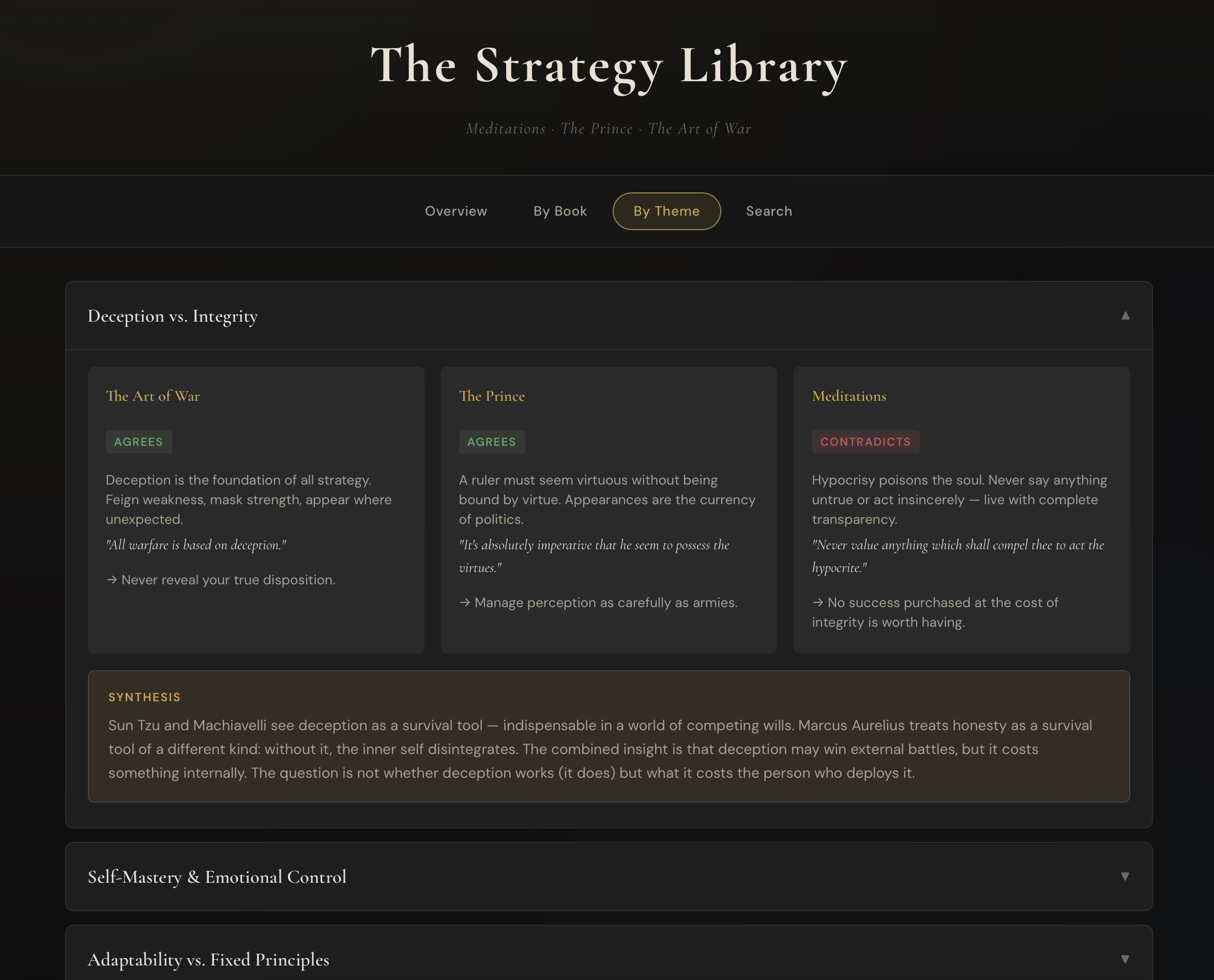
I’ll walk through an example I call The Strategy Library.
The source material is three public-domain classics:
- *Meditations* by Marcus Aurelius
- *The Prince* by Niccolò Machiavelli
- *The Art of War* by Sun Tzu
I chose these because they form a useful trilogy.
Sun Tzu gives us external strategy: conflict, positioning, timing, deception, and terrain.
Machiavelli gives us political strategy: power, perception, authority, survival, and the realities of leadership.
Marcus Aurelius gives us internal strategy: self-mastery, discipline, restraint, judgment, and the governance of the self.
You could read all three books front to back, and there is real value in doing that. But if your goal is to understand where these thinkers agree, where they contradict each other, and how their ideas can be applied together, a linear reading path is not always the best interface.
The Knowledge Navigator turns the three books into an interactive strategy library.
You can start with an overview of the main tensions and debates. You can browse by book. You can browse by theme. You can search across passages, principles, and frameworks. You can click into a universal theme and see how each thinker approaches it.
For example, on the theme of deception versus integrity, Sun Tzu and Machiavelli largely agree that deception is a necessary instrument of strategy. Marcus Aurelius pushes in the opposite direction, treating hypocrisy as a corruption of the self.
That contrast is the point.
The artifact is not just telling you what each book says. It is showing you the relationship between the books.
That is where the learning accelerates.
Why this is better than a summary
A summary compresses.
A Knowledge Navigator organizes.
That distinction matters.
A summary gives you a single path through information. A Knowledge Navigator gives you multiple paths. You can move by source, by theme, by search, by comparison, or by related idea.
A summary is usually consumed once. A Knowledge Navigator can become a reusable reference tool.
A summary often hides the tension between sources. A Knowledge Navigator can make those tensions explicit.
A summary is passive. A Knowledge Navigator is exploratory.
This is why I think the format matters so much. When you combine AI extraction with strong design principles, you get something more useful than a wall of generated text. You get a working interface to knowledge.
## The design principles matter
This is not just a coding trick.
The quality of the Knowledge Navigator depends on the quality of the structure. If you dump a bunch of text into a model and ask it to “make a knowledge base,” you will probably get something generic.
The prompt has to define what good looks like.
A strong Knowledge Navigator should include multiple navigation paths. At minimum, you should be able to move by source, by theme, and by search.
It should make cross-references visible. The best insights often come from seeing where two sources agree, where they contradict each other, or where one completes the other.
It should use progressive disclosure. Do not show everything at once. Start with the structure, then let the user expand into detail.
It should be self-contained and portable. A single HTML file with everything inline is often enough. No server. No build process. No dependency management. Open it in a browser and use it.
Most importantly, it should be designed around the way a human actually wants to explore the material.
That is the difference between an output and a tool.
Context windows still matter
There is one practical limitation to keep in mind.
The source material has to fit within the model’s context window, or you need to break the process into steps.
For smaller projects, you can provide the sources and the prompt together and have the model generate the artifact in one pass.
For larger projects, use a two-step workflow. First, have the model extract the themes, passages, principles, frameworks, and cross-references from the source material. Then use that structured extraction as the input for the HTML interface generation.
This gives the model a cleaner design task and usually produces a better artifact.
## Where this gets useful
The three-book Strategy Library is just a demo. The same pattern applies almost anywhere.
You could build a Knowledge Navigator for the five books everyone in your industry keeps recommending.
You could build one from a client’s internal strategy documents, policies, and reports.
You could build one from a semester of course material.
You could build one from a research literature review.
You could build one from your company’s internal documentation so a team can search, explore, and understand institutional knowledge without digging through folders and chat threads.
This is where I think the idea becomes powerful. AI is not only a way to answer questions. It is a way to build tools that help us think.
The future of learning is navigable
We are all trying to learn more, faster, with less time.
The answer is not always to read faster. It is not always to ask for a shorter summary. Sometimes the answer is to change the interface.
A Knowledge Navigator gives you a way to take dense source material and turn it into something visual, searchable, cross-referenced, persistent, and shareable.
It helps you move from passive consumption to active exploration.
And that is the deeper opportunity with AI.
Not just asking machines to explain the world to us.
But using machines to build better interfaces for understanding it ourselves.
If you want to build your own Knowledge Navigators, I go deeper into the prompts, examples, and use cases inside the school community linked below. The starter prompts will get you moving, but the real skill is learning how to design the artifact around your own use case.
Because the future of learning is not just more content.
It is better navigation.